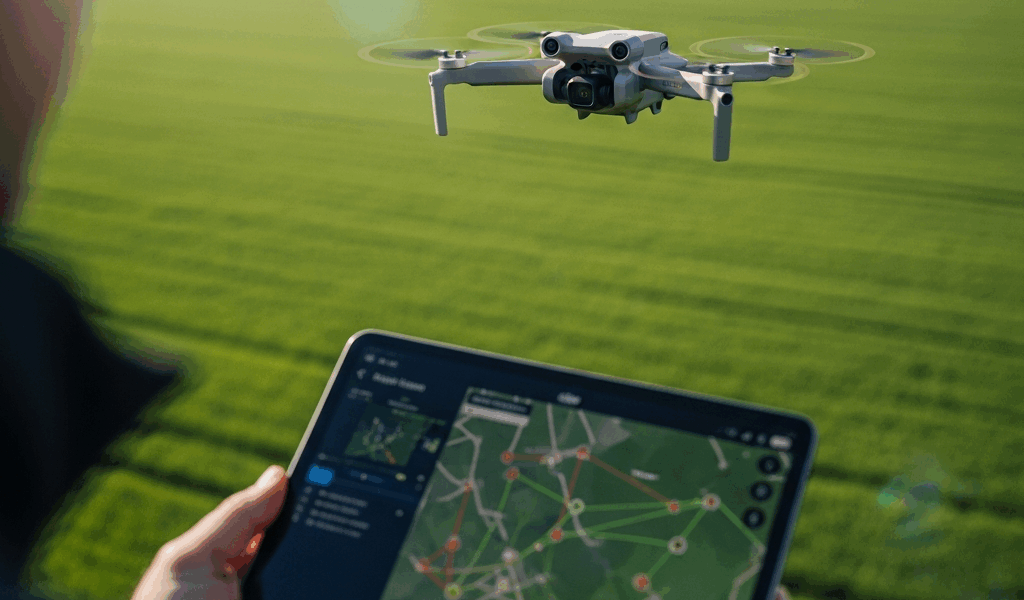
You bought a DJI Mini 4 Pro, flew it around the park a few times with DJI Fly, and now you want to do something the app will not let you do — program a repeatable flight path, run an automated orbit, or map a property with overlapping photo coverage. DJI Fly was never designed for those missions. That is where third-party apps come in, and the right one depends entirely on what you are trying to accomplish.
I have tested DJI Fly, Litchi, and Dronelink on Mini 4 Pro hardware over the past year. Each app serves a different pilot, and picking the wrong one means paying for features you will never touch while missing the one you actually need.
Why Third-Party Apps Exist — DJI Fly Limitations
DJI Fly handles manual flight, QuickShots, and basic video editing. For recreational flying and social media content, it does everything most people need. The app is free, updated alongside every firmware release, and provides reliable manual control.
What DJI Fly cannot do: pre-programmed waypoint missions where the drone flies a saved GPS path autonomously. No orbit missions with precise radius and altitude control. No cable cam simulation. No automated survey patterns for mapping or inspection work. If your use case requires any of these, DJI Fly is not the tool — and no amount of updates will change that, because DJI has deliberately kept these features out of their consumer app.
DJI Fly — Still Right for 80% of Mini Drone Flights
Before jumping to a paid third-party app, be honest about what you actually need. DJI Fly includes QuickShots — Dronie, Rocket, Circle, Helix, Boomerang, Asteroid — that give beginners automatic cinematic moves without learning any advanced flight techniques. Master Shots automate a multi-move sequence that DJI edits into a single clip. ActiveTrack on the Mini 4 Pro follows a subject automatically.
For travel photography, Instagram clips, family vacation footage, and learning to fly — DJI Fly is all you need. The limitation only matters when you try to save a GPS flight path and refly it identically, or when you need the drone to execute a precise pattern without your hands on the sticks.
Litchi — Best for Waypoint Missions and Cinematic Automation
Litchi costs $25 as a one-time purchase and it is the most mature third-party DJI app on the market. The headline feature is waypoint missions: draw a flight path on a map, set altitude, speed, and camera actions at each point, and the drone flies it autonomously.
The Focus feature locks the camera on a specific GPS point while the drone moves freely along any path. This is how you get those smooth tracking shots of a building or landmark where the camera stays perfectly locked while the drone orbits. VR mode supports FPV headset use for an immersive flying experience.
Compatibility is confirmed for the Mini 4 Pro and Mini 3 Pro. The Mini 2 SE and older Mini 2 are NOT compatible — DJI did not provide third-party SDK access on those models, and there is no workaround. Check Litchi’s compatibility list before buying if you own an older Mini.
Litchi makes sense for: real estate exterior surveys where you want to fly the same path around a property every time, repeatable cinematic shots over familiar terrain, inspection-style flights where consistency matters. If your use case is “fly this exact path every Tuesday to document construction progress,” Litchi does it perfectly.
Dronelink — Best for Survey Missions and Professional Mapping
Dronelink was built for photogrammetry and survey-grade mapping. The killer feature is automated grid patterns — the classic lawn mower flight path that covers an area with consistent overlap needed by mapping software like Pix4D and DroneDeploy.
The free tier gives you a limited number of missions per month, which is enough to evaluate the app. The professional tier at $20 per month unlocks unlimited missions, advanced flight planning, and priority support.
Dronelink makes sense for: agriculture field surveys, construction site documentation, solar panel inspection patterns, property boundary mapping. It is overkill for recreational Mini drone pilots. If you are not feeding the images into mapping software afterward, you do not need Dronelink — Litchi’s waypoint missions will do what you want at a fraction of the cost.
Which App for Which Mini Model
This compatibility table is the information nobody puts in one place, and it matters because buying the wrong app for your drone means throwing away money.
DJI Mini 4 Pro: all three apps supported — DJI Fly, Litchi, Dronelink. Full third-party SDK access. This is the Mini to own if third-party apps matter to you.
DJI Mini 3 Pro: all three apps supported with full SDK access. Same flexibility as the Mini 4 Pro for app compatibility.
DJI Mini 3: limited third-party support. Check Litchi’s specific compatibility list before purchasing — some firmware versions work, others do not.
DJI Mini 2 SE and Mini 2: DJI Fly only. No third-party SDK support from DJI on these models. This is a hardware and licensing limitation — not something that changes with a firmware update. If you own a Mini 2 SE and want waypoint missions or automated flight, you need to upgrade to a Mini 3 Pro or Mini 4 Pro. There is no workaround.
Original Mavic Mini: DJI Fly and limited Litchi support. Check compatibility before investing.
The verdict: if you are happy with QuickShots and manual flight, stay with DJI Fly and save your money. If you need repeatable waypoint missions for real estate, inspection, or cinematic work, buy Litchi for $25. If you need survey-grade mapping with grid patterns, invest in Dronelink. And if you own a Mini 2 SE — DJI Fly is your only option regardless of what you want to do.


Stay in the loop
Get the latest light drones updates delivered to your inbox.