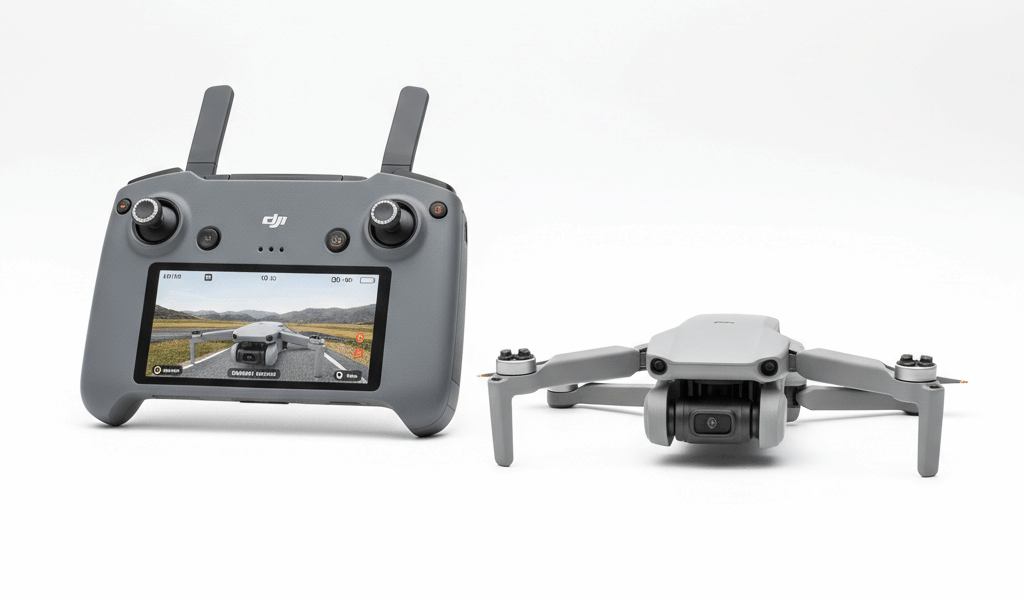
DJI controller choices have gotten complicated with all the options flying around these days. As someone who’s owned both the RC-N1 and the DJI RC with built-in screen, I learned everything there is to know about which one actually makes sense for different pilots. Today, I’ll share what the real differences are beyond the marketing specs.
This article includes affiliate links. We may earn a commission at no extra cost to you.
The choice affects your flying experience, phone battery life, and total system cost. Neither option is universally better — it depends on how you fly.
RC-N1: What You Get in the Box
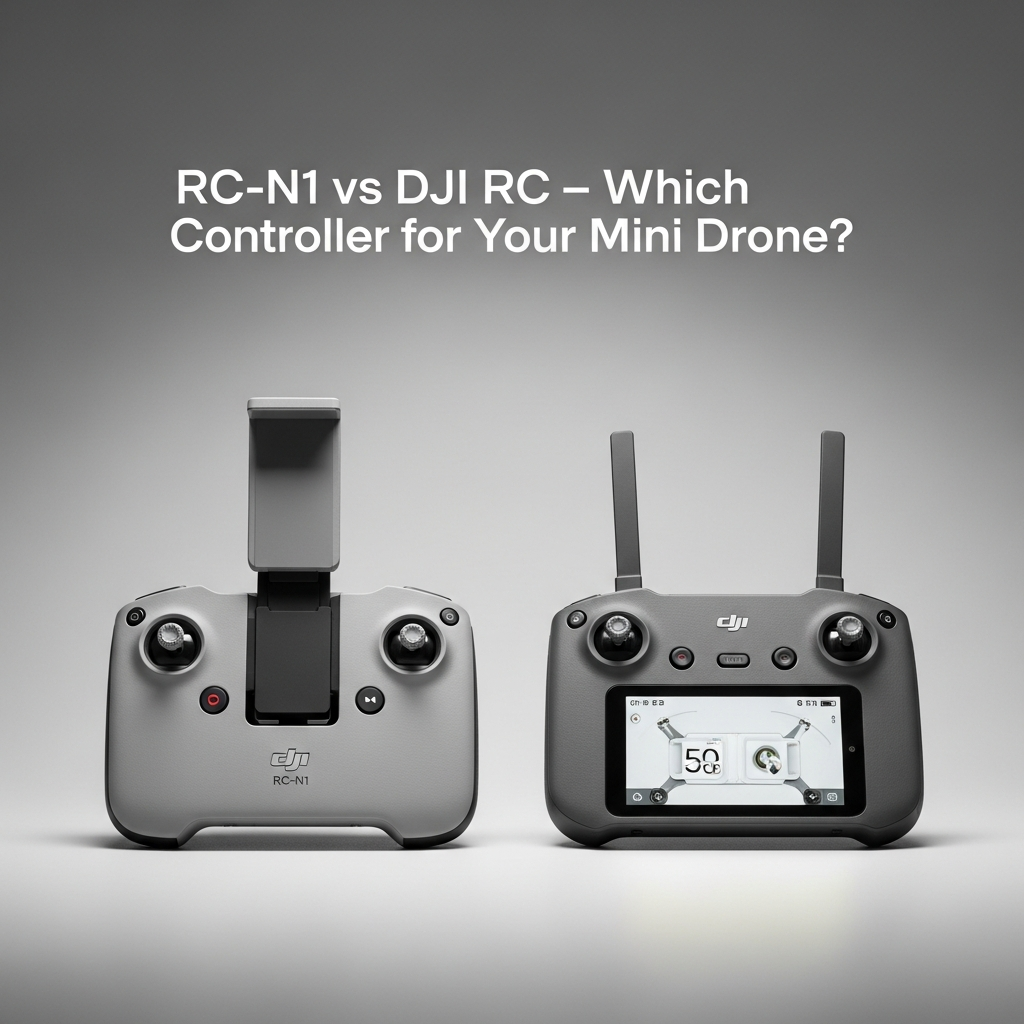
The RC-N1 ships with most Mini series drones as the included controller. Traditional design that uses your smartphone as the display, clamping it above the sticks for viewing during flight.
Build quality impresses for an included accessory. That’s what makes DJI endearing to us drone pilots — even their “basic” controller feels solid with responsive gimbals and adequate button placement. Ergonomics work reasonably for average hand sizes, though extended sessions may cause fatigue.
Phone mounting accommodates most standard smartphones, though cases sometimes interfere with secure clamping. Maximum phone width limits larger device compatibility — check dimensions before assuming your phone fits, especially if you’re running a rugged case.
DJI RC: The Integrated Screen Experience
The DJI RC builds a bright, touch-sensitive display directly into the controller body, eliminating phone dependence entirely. Power on and fly — no cables, no phone mounting, no app updates interrupting your session when you’re already at the park.
The 5.5-inch 1080p screen provides excellent outdoor visibility with 700-nit brightness. Viewing angles work from various positions, though direct noon sunlight still requires some positioning consideration. Better than most phones in practice.
Probably should have led with this: the operating system is Android-based but locked to DJI applications. You cannot install third-party apps like Litchi on the DJI RC. If you need mission planning software or specialized automation tools, this controller won’t work for you.
Outdoor Visibility Actually Matters
Screen brightness often determines controller usability. The difference between adequate and frustrating experiences during sunny day flying.
The DJI RC’s 700-nit display handles most outdoor conditions confidently. Direct noon sun may require shading or positioning adjustments, but general outdoor flying presents few visibility challenges.
Phone brightness varies dramatically by device. Premium smartphones with 1000+ nit displays exceed the DJI RC’s capability. Budget phones with 400-500 nit screens struggle outdoors, becoming nearly unusable in bright conditions. If you’re running a three-year-old mid-range phone, the DJI RC will likely be a significant upgrade.
Most pilots find the DJI RC more consistently visible than their phones. Not because it’s brighter than every phone, but because its purpose-built design ensures adequate brightness regardless of which phone you might otherwise use.
Setup Speed Changes How You Fly
The DJI RC transforms startup experience. Power on the controller, power on the drone, wait briefly for connection — flying begins within 30-60 seconds typically.
RC-N1 setup involves additional steps: unlock phone, launch DJI Fly app, connect cable, wait for app initialization, establish link. This sequence extends startup to 2-3 minutes minimum, longer if app updates intervene at the worst possible moment.
For spontaneous flying — capturing unexpected moments or grabbing quick shots — the DJI RC’s speed advantage proves genuinely valuable. Prepared sessions where setup time matters less favor neither option particularly.
Your Phone Battery Will Thank You
Extended flights drain smartphone batteries significantly. Processing video feeds, running GPS, and powering bright displays depletes phones faster than normal use patterns.
After a full morning of flying, your phone may need charging before afternoon sessions — or before navigation home. This dependency creates logistical considerations the DJI RC eliminates. I’ve been stuck with a dead phone and no way to get Google Maps directions more than once.
Phones also generate heat during intensive processing. Thermal throttling in hot conditions can reduce display brightness or impair performance. Purpose-built drone controllers manage heat more effectively than multi-purpose smartphones designed for occasional demanding tasks.
Third-Party Apps: The Dealbreaker
RC-N1’s phone requirement enables third-party applications like Litchi, Dronelink, and various planning tools. These apps offer features beyond DJI Fly’s capabilities for pilots needing specialized functionality.
The DJI RC’s closed system restricts operation to DJI Fly exclusively. Pilots depending on third-party apps must use RC-N1 or alternative controllers — the integrated screen doesn’t compensate for lost software capabilities no matter how convenient it is.
For most recreational pilots, DJI Fly provides adequate features. Professional users with specific workflow requirements should verify app compatibility before committing to DJI RC. Don’t buy it assuming you’ll figure out Litchi later — you won’t be running Litchi on it.
Portability Tradeoffs
The DJI RC adds size and weight compared to RC-N1 alone — but eliminates phone weight and cable clutter from your flying kit. Net portability difference favors neither option dramatically.
DJI RC’s fixed screen eliminates phone mounting fumbling in the field. Wind, cold fingers, and cramped launch locations all favor controllers that assemble themselves. This convenience advantage compounds across many flights.
Travel cases designed for Mini series drones accommodate both controller options, though DJI RC fits differently than RC-N1. Verify case compatibility when mixing components from different purchase bundles.
Range and Signal: Basically Identical
Both controllers use identical OcuSync transmission systems with equivalent range specifications. Signal performance differences between RC-N1 and DJI RC are minimal — the transmission hardware matches exactly.
Phone interference could theoretically affect RC-N1 signal performance, but practical differences remain difficult to measure in real-world flying. Both controllers achieve multi-kilometer range under typical conditions.
The Cost Calculation
The DJI RC commands $300-350 when purchased separately, or adds $150-200 to bundle prices versus RC-N1 configurations. This premium buys convenience and screen quality.
However, most pilots already own smartphones suitable for drone use. The RC-N1 leverages existing phone investment rather than requiring dedicated hardware purchase. Budget-conscious pilots reasonably favor this approach, especially if the phone is recent enough to have decent brightness.
Evaluate upgrade cost against flight frequency. Pilots flying weekly gain more value from DJI RC convenience than those flying monthly. Per-flight convenience cost drops as usage increases.
Stick Feel: Non-Factor
Both controllers use similar gimbal mechanisms with comparable stick feel. Precision and response match closely — stick hardware doesn’t differentiate these options meaningfully.
Physical button layouts differ slightly between controllers. DJI RC’s integrated design positions controls somewhat differently than RC-N1. Most pilots adapt quickly to either layout within a session or two.

Stay in the loop
Get the latest light drones updates delivered to your inbox.