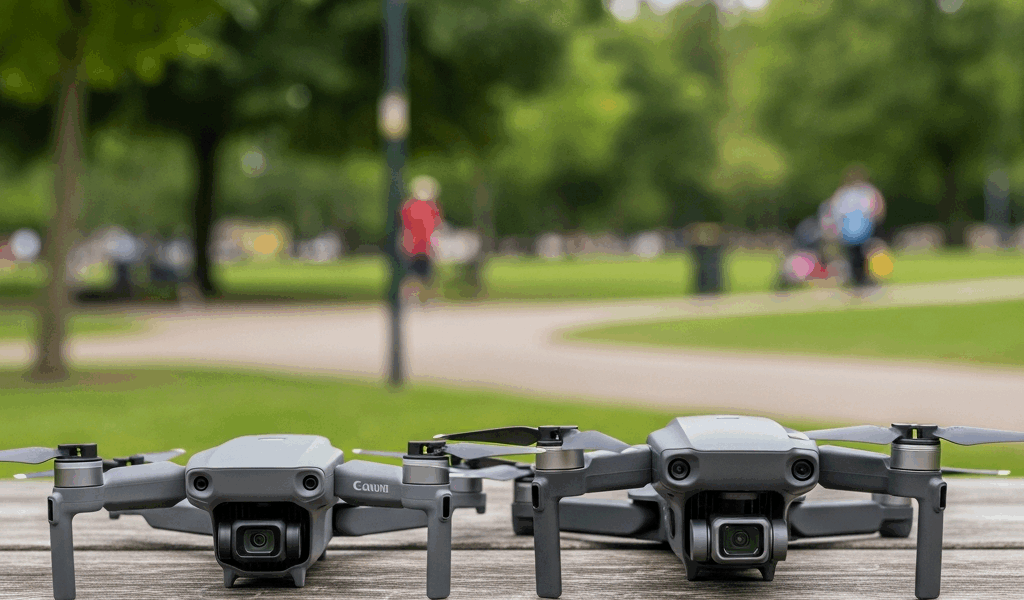
You are looking at two DJI Mini drones and the price gap is staring you in the face — $299 for the Mini 2 SE versus $759 for the Mini 3 Pro. That is a $460 difference on the base models. Your brain is telling you to save the money. Your gut is telling you the cheaper one might not be good enough. Both instincts have a point, but one factor should drive the entire decision for a beginner.
Obstacle sensing. The Mini 3 Pro has it. The Mini 2 SE does not. For a new pilot, this single feature changes whether your first month of flying involves learning to compose great shots or waiting three weeks for a replacement propeller after you clipped a tree branch you did not see on your phone screen.
The Price Gap and What You Get for It
DJI Mini 2 SE: $299 without controller, $369 with RC-N1. DJI Mini 3 Pro: $759 with RC-N1, $959 with the Fly More Combo. The gap is $390–590 depending on configurations.
What the Mini 3 Pro adds for that premium: front and rear obstacle sensing (APAS 4.0), 4K video at 60fps versus the Mini 2 SE’s 4K at 30fps, True Vertical Shooting mode for native portrait video at full 4K resolution, a larger 1/1.3-inch sensor versus the Mini 2 SE’s 1/3-inch sensor, slightly longer flight time at 34 minutes versus 31, and full third-party app support through DJI’s SDK.
What they share: sub-250 gram weight (no FAA registration needed for recreational flying), O3 transmission, 12MP photos, Level 5 wind resistance. Both are legitimately good Mini drones. The question is whether the extras justify doubling the price.
Obstacle Sensing Changes Everything for Beginners
The DJI Mini 2 SE has zero obstacle sensing. None. If you fly it toward a tree branch, a fence, or a building wall, the drone will hit it at whatever speed you are traveling. There is no warning, no automatic braking, no avoidance maneuver. Just a sickening crunch and a drone falling out of the sky.
The Mini 3 Pro has front and rear obstacle sensing with APAS 4.0. The sensors detect objects in the flight path and either stop the drone or route it around the obstacle automatically. It is not perfect — side and top obstacles are undetected — but the front-facing protection alone prevents the most common beginner crash scenario: flying forward into something you did not see on the small phone screen.
Here is the math that matters. Beginners crash. It is not a question of skill or caution — depth perception through a 6-inch phone screen is fundamentally different from depth perception with your own eyes. A branch that looks ten feet away might be three feet away. A Mini 2 SE propeller replacement costs $20. Motor damage from a hard hit costs $100–150. A replacement gimbal after a crash can run $200+. One serious crash on a Mini 2 SE can eat half the price difference between the two drones.
If your budget genuinely allows for the Mini 3 Pro, the obstacle sensing alone justifies the premium for a beginner. It keeps you flying instead of repairing.
Camera Quality — The Real-World Difference for Social Media
Mini 2 SE: 4K at 30fps, 2.7K at 60fps, 12MP photos, 1/3-inch sensor with fixed f/2.8 aperture. Mini 3 Pro: 4K at 60fps, slow-motion capability, 48MP photos, 1/1.3-inch sensor. The sensor size difference is roughly four times larger on the Mini 3 Pro.
In bright daylight — which is when most beginners fly — both cameras produce great footage. Seriously. Mini 2 SE daylight video looks crisp, colorful, and perfectly shareable. You would struggle to tell the difference on an Instagram post or a YouTube travel vlog shot in good light.
The gap shows up in two places. Low light: the Mini 3 Pro’s larger sensor captures more light, producing cleaner golden-hour and dawn footage with less noise. And vertical video: the Mini 3 Pro physically rotates its camera to shoot portrait mode at full 4K resolution. The Mini 2 SE can only do vertical by cropping the horizontal 4K frame, which cuts resolution significantly. If TikTok and Instagram Reels are your primary output, the native vertical shooting is a genuine advantage.
Third-Party App Support — Mini 3 Pro Only
The Mini 2 SE only works with DJI Fly. No Litchi. No Dronelink. No third-party waypoint missions, no automated flight paths, no survey patterns. DJI did not provide SDK access for the Mini 2 SE, and this will not change with a firmware update — it is a hardware and licensing decision.
The Mini 3 Pro has full SDK access. Litchi, Dronelink, and other third-party automation apps work. If you think you might want to program a repeatable flight path around a property, run an automated orbit for a real estate video, or experiment with photogrammetry mapping — this capability is permanently unavailable on the Mini 2 SE.
Most beginners will not need third-party apps in their first six months of flying. But if the drone hobby sticks and you start wanting more creative control, the Mini 3 Pro grows with you. The Mini 2 SE hits a ceiling that no software update can raise.
The Beginner Verdict
Buy the Mini 2 SE if: you have a firm budget cap at $300, you want to learn whether you even enjoy flying before committing more money, and you will fly recreationally in wide open spaces where obstacles are not a concern. Understand what you are giving up — no obstacle sensing means you need to fly carefully and keep your distance from trees, buildings, and people. That is manageable in a park or at a beach, but nerve-wracking in a neighborhood with fences and power lines.
Buy the Mini 3 Pro if: you can budget $759, you plan to fly more than a handful of times, you want vertical video for social media, or you live and fly in areas where obstacles are everywhere — suburbs, parks with mature trees, urban environments. The obstacle sensing is not a luxury feature for beginners. It is the difference between a drone that protects you from your own learning curve and one that punishes you for it.
The single most important thing I can tell a beginner: if you can afford the Mini 3 Pro, buy it. The obstacle sensing keeps you flying. The camera grows with your skills. The third-party app support extends the drone’s useful life by years. The Mini 2 SE is a fine drone, but the Mini 3 Pro is the one you will not outgrow.

Stay in the loop
Get the latest light drones updates delivered to your inbox.