Micro drone maintenance has gotten complicated with all the different motor types and build configurations flying around these days. As someone who’s crashed more tiny whoops than I care to admit, I learned everything there is to know about keeping these little aircraft in flying shape. Today, I’ll share the cleaning and maintenance routines that actually matter.
Motors Get Dirty Fast
That’s what makes micro drones endearing to us FPV pilots — they go places bigger quads can’t. Problem is, those places include grass, dust, carpet fibers, and apparently every strand of hair within a fifty-foot radius.
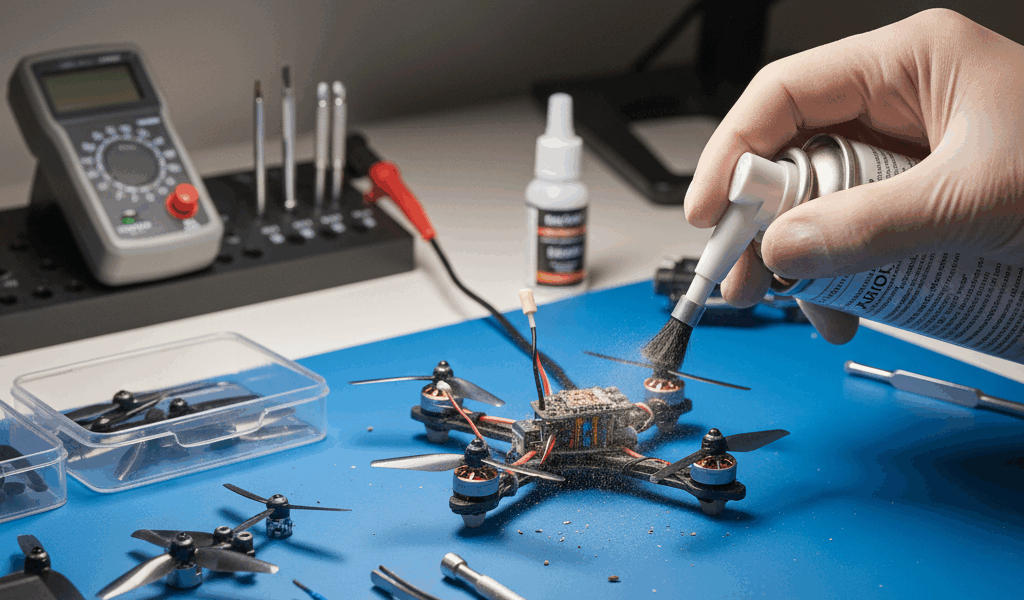
Compressed air handles most debris. Short bursts into the motor openings knock loose particles out without risking damage. Keep the can upright though — propellant liquid and electronics don’t mix well.
When compressed air isn’t cutting it, you need to disassemble the motor. Remove the bell (that’s the spinning outer part) by unscrewing the C-clip or set screw, then clean the stator windings with isopropyl alcohol and soft brushes. It takes some care, but the performance difference in a freshly cleaned motor is noticeable.
Probably should have led with this: check your bearings while you’ve got the motor apart. Spin them and feel for grinding or resistance. If they’re rough, the motor’s done — no amount of cleaning fixes worn bearings.
Props Take More Abuse Than You’d Think
Every crash stresses your propellers even when they look fine afterward. I’ve seen pilots ignore minor damage and wonder why their footage has jello.
Visual inspection before every flight catches the obvious stuff — cracks, chips, bends. But run your finger along the edges too. You can feel nicks that are invisible to casual inspection, and even tiny edge damage creates disproportionate vibration at high RPM.
Replace props in matched sets. Mixing worn and new props creates imbalance that affects flight characteristics and video quality. Most pilots swap all four when any single prop needs replacement. At the cost of micro props, it’s cheap insurance.
Tiny Whoop props typically survive 10-20 flights before they’re noticeably worn. Larger toothpick and cinewhoop props may last longer with careful flying, but rotating them regularly keeps performance consistent.
Sensor Lenses Need Attention
Vision positioning systems rely on downward-facing cameras and sensors for hover stability. Dirty lenses degrade performance, especially in well-lit indoor environments where these systems work best.
Microfiber cloths dampened with lens cleaner work for sensor surfaces. Don’t touch lenses directly — fingerprint oils smear across optical surfaces and require more cleaning to remove.
After crashes, inspect sensors for physical damage. Cracked or scratched covers impair function permanently, and replacement assemblies are the only fix when that happens.
Camera and Gimbal Care
Gimbal assemblies include delicate motors and precision components that don’t survive rough treatment. Always use gimbal covers during transport and storage — these protective shells immobilize mechanisms and shield lenses from contact damage.
Clean camera lenses with dedicated lens cloths and appropriate cleaners. Compressed air first removes loose dust, then circular motions with clean cloths handle remaining contamination without scratching.
Check gimbal calibration periodically through your drone app. Run the calibration procedure after any impact or when footage shows unexpected drift or horizon issues.
Battery Maintenance Isn’t Optional
LiPo batteries need specific care for both safety and longevity. Proper maintenance extends battery life while reducing fire risks that aren’t theoretical.
Inspect batteries visually before charging and flying. Swelling (puffing) indicates internal damage — puffy batteries need immediate retirement regardless of remaining capacity. I’ve seen puffy batteries ignite without warning, and it’s not something you want happening in your house.
Store batteries at 40-60% charge for long-term storage. Storing fully charged or fully depleted accelerates degradation that shortens usable lifespan.
Avoid extreme temperatures during storage and charging. Never charge cold batteries below 40°F or store batteries in hot vehicles. Temperature abuse creates real safety hazards beyond just shortened lifespan.
When flight times drop 20% or more from new-battery baselines, degradation has progressed enough to warrant replacement. Squeezing a few extra flights from degraded batteries isn’t worth the risk.
Frame Inspection After Crashes
Inspect frames carefully after any significant crash. Hairline cracks in carbon fiber or stressed plastic may escape casual notice but compromise structural integrity in ways that show up mid-flight.
Flex arms gently, feeling for unusual give or clicking that indicates hidden damage. Sound arms feel solid and consistent along their length — any inconsistency warrants closer inspection or replacement.
Check motor mounts for loosening. Crashed drones commonly loosen motor mounting hardware. All four motors should seat firmly without play. Blue threadlocker on motor screws prevents loosening without making future removal impossible.
Electronics Cleaning
Circuit boards collect dust and occasionally moisture. Periodic cleaning maintains reliable operation and helps you spot potential problems early.
Isopropyl alcohol (90% or higher) safely cleans most drone electronics. Apply with cotton swabs or soft brushes, avoiding excess liquid that might pool under components.
Compressed air dislodges dust from tight spaces between components. Short, controlled bursts work better than sustained blasts that might dislodge small parts you’d rather stayed attached.
Allow complete drying before applying power after any liquid cleaning. Patience prevents short circuits from residual moisture that can destroy components instantly.
Firmware Updates Matter
Software maintenance matters alongside hardware care. Current firmware ensures optimal performance and keeps safety features working properly.
Update apps before attempting firmware updates — outdated apps may fail to complete firmware processes properly. Always update on reliable power and data connections, not mid-drive somewhere with spotty signal.
Read update notes before installing. Occasionally updates change features or requirements in ways you should understand beforehand. Community forums often discuss update experiences shortly after releases, which helps you know what to expect.
Don’t update immediately before important flights. Fresh updates occasionally introduce issues requiring subsequent patches. Allow a few days for community feedback when timing permits.
Storage Practices
How you store your drone affects its condition when you return to fly. Proper storage extends equipment lifespan significantly compared to just tossing it in a bag.
Store drones in cases that protect from dust, impact, and temperature extremes. Avoid leaving equipment in vehicles where temperatures swing between hot and cold — that thermal cycling degrades batteries and electronics faster than you’d expect.
Remove propellers during extended storage. This protects props from compression damage and reduces dust accumulation on motor shafts.
Discharge batteries for storage if you won’t fly for several weeks. Most drone apps include storage discharge functions that bring batteries to appropriate levels automatically.
Building a Maintenance Schedule
Regular schedules ensure maintenance actually happens instead of being forgotten until something breaks. Simple routines catch issues early when they’re cheap to fix.
Before each flight: visual prop check, battery inspection, sensor cleanliness verification, gimbal cover removal.
Weekly (for active pilots): motor inspection, frame check, thorough prop examination, battery rotation.
Monthly: full cleaning, firmware check, bearing inspection, storage battery maintenance.
Document maintenance in flight logs. Tracking patterns helps identify recurring issues and anticipate replacement schedules before failures occur mid-flight.