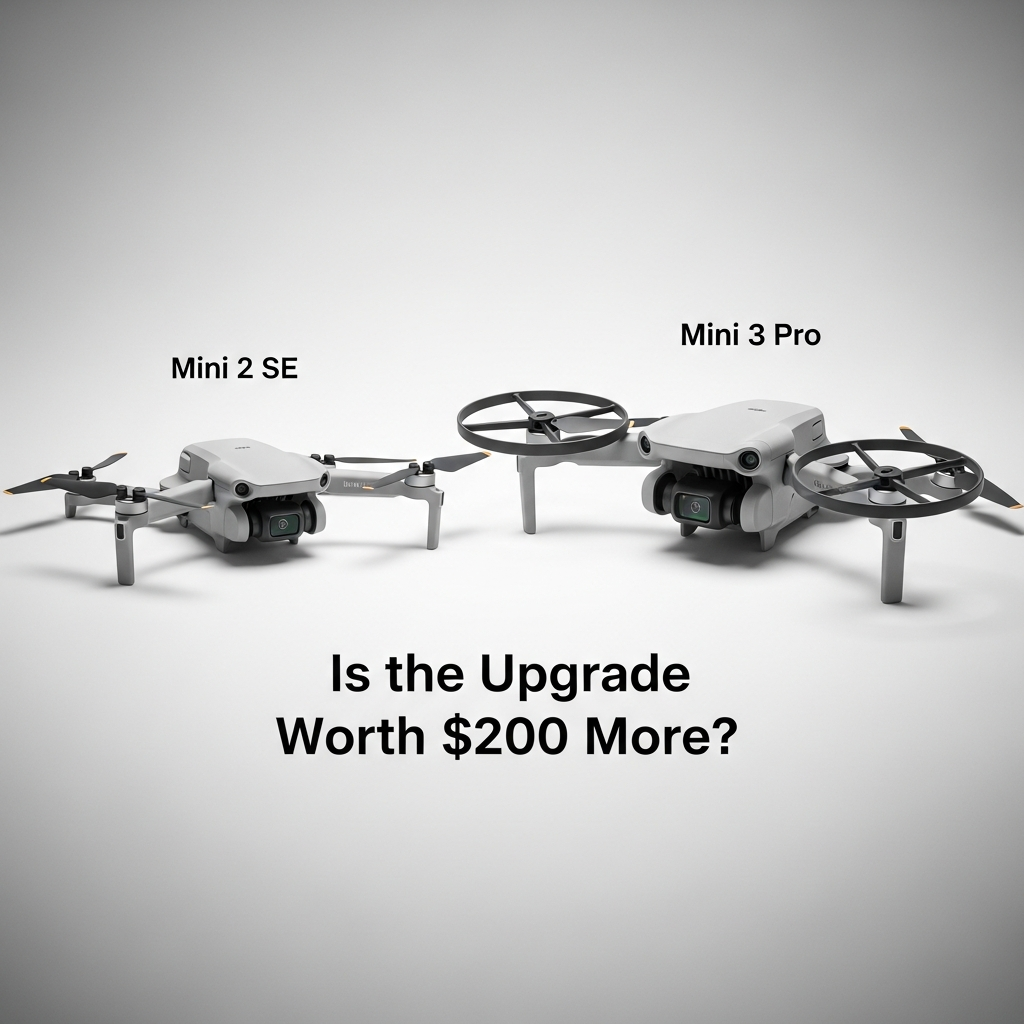
DJI Mini 2 SE vs Mini 3 Pro — Is the Upgrade Worth $300 More?
The DJI Mini 2 SE vs Mini 3 Pro question has gotten complicated with all the spec comparisons and YouTube rabbit holes flying around. As someone who flew the Mini 2 SE for nearly a year before finally switching, I learned everything there is to know about whether that $300 gap actually means anything in the real world. I’d been genuinely happy with the Mini 2 SE — shooting trails, coastal cliffs, the occasional local hiking group outing — until the gaps started showing. Not constantly. But enough to matter. This is written specifically for people who already own the Mini 2 SE, not someone choosing cold between the two. That’s a different conversation entirely. You’ve already spent the money. The real question is whether spending roughly $300 more buys you anything you’ll actually use.
This article includes affiliate links. We may earn a commission at no extra cost to you.
Short answer: it depends on what you’re shooting and where. Long answer is everything below.
What You Gain by Upgrading
Frustrated by nearly clipping a tree branch on a canyon approach shot, I started researching the Mini 3 Pro obsessively — spreadsheets, forums, Reddit arguments at midnight. That branch didn’t damage anything. But it woke me up fast. The Mini 2 SE has zero obstacle avoidance. None. It will fly directly into whatever you point it at, trustingly, like a golden retriever headed toward traffic.
The Mini 3 Pro has tri-directional obstacle avoidance — forward, backward, and downward sensors. These aren’t a gimmick. Flying through a forest clearing during a real estate shoot last July, I let the drone creep forward slowly and watched it stop about 2 meters from a pine branch I genuinely hadn’t seen on screen. That single moment justified the upgrade for my use case. Full stop.
The Camera Sensor — Actual Numbers
But what is the real difference between these two sensors? In essence, it comes down to surface area and what that means when light gets scarce. But it’s much more than that. The Mini 2 SE shoots 12MP on a 1/2.3-inch sensor. The Mini 3 Pro runs a 1/1.3-inch sensor — significantly larger — at 48MP. Midday on a clear day, the difference is subtle. You’d have to pixel-peep aggressively to catch it. But shoot at dusk, in a shaded valley, or on an overcast morning in the Pacific Northwest — my usual conditions, honestly — and the Mini 3 Pro pulls in noticeably more light with far less grain.
I shot the same overlook two weeks apart — once with each drone — around 6:45 PM in late April. Same spot, same settings. The Mini 2 SE image was usable but noisy at ISO 400. The Mini 3 Pro shot looked clean. That’s not marketing language. That’s just physics — bigger sensor, more light gathered, less noise invented by the processor to fill the gaps.
Also worth noting: the Mini 3 Pro shoots 4K at 60fps. The Mini 2 SE tops out at 4K/30fps. If you’re shooting anything with real motion — mountain biking, events, kids running — that 60fps ceiling matters more than you’d expect until you need it.
Vertical Shooting Mode
The Mini 3 Pro’s camera rotates 90 degrees for native vertical shooting. This sounds minor until you’ve spent 25 minutes in post trying to wrestle horizontal drone footage into a 9:16 format for Reels and watched half your image disappear in the crop. Vertical mode gives you full-resolution native vertical shots — no cropping, no compromises. If you post to TikTok or Instagram Reels more than occasionally, this feature alone is a genuine time saver. I was burning close to 45 minutes per edit session fighting this exact problem before switching.
Flight Time
Mini 2 SE: 31 minutes rated. Mini 3 Pro: 34 minutes standard, up to 51 minutes with the Intelligent Flight Battery Plus. Real-world numbers look a little different — I consistently land the Mini 2 SE around 27-28 minutes with 15% battery remaining. The Mini 3 Pro standard battery gets me roughly 30 minutes in similar conditions. Modest gain with the standard battery. The Plus battery — sold separately, around $79 — changes that math considerably if extended flight time is a genuine need for you.
What Stays the Same
Probably should have opened with this section, honestly — because for most Mini 2 SE owners, this list runs longer than expected.
Both drones weigh under 250 grams. This is the single most important shared feature — and it’s one you already have. Sub-250g means you operate under the same FAA recreational rules with no registration requirement, and you retain access to locations where heavier drones are restricted. Upgrading doesn’t give you this. You already own it.
Transmission Range — Already Excellent
The Mini 2 SE uses OcuSync 3.0 with a 10km transmission range. The Mini 3 Pro uses OcuSync 3.0 with a 10km transmission range. Identical. You gain nothing here. In practical terms, both drones will fly farther than visual line of sight rules legally allow anyway — so this spec is mostly academic for recreational pilots flying within the rules.
Wind Resistance
Both are rated Level 5 wind resistance — up to about 38 km/h. I’ve flown both in gusty coastal conditions with real chop in the air and noticed no meaningful difference in stability. They behave almost identically when the wind picks up.
Photo Quality in Good Light
In solid daylight — midday sun, open sky, clean horizon — the Mini 2 SE takes genuinely beautiful photos. I’ve had 24×36 inch prints made from Mini 2 SE footage. They looked excellent. If you’re a weekend photographer shooting landscapes on clear afternoons, the Mini 3 Pro’s camera is not going to transform your work. The floor is already solid. The ceiling improves — but only meaningfully when conditions get difficult.
When the Upgrade Is Worth $300
You fly near trees, buildings, or any obstacles with regularity. This is the clearest case for upgrading. Obstacle avoidance isn’t about careless flying — it’s about what happens in automated flight modes, when you’re watching the shot instead of the physical drone, or when something drifts into your path unexpectedly. The Mini 2 SE will hit it. The Mini 3 Pro has a genuine fighting chance of stopping before contact.
You shoot social media content at volume. If you’re posting vertical content to TikTok, Instagram Reels, or YouTube Shorts more than a few times a month, the native vertical shooting mode probably earns back its cost in post-production time alone. That’s what makes this feature endearing to us content creators — it’s not flashy, but it quietly eliminates a tedious problem.
You shoot in mixed or low lighting. Golden hour, overcast skies, shaded canyons, foggy mornings. The 1/1.3-inch sensor handles these situations meaningfully better. Not miraculously — it’s still a small drone sensor — but the difference is visible without zooming in on anything.
You shoot paid work. Real estate, events, commercial content. The obstacle avoidance reduces risk during complex shots near structures. The 48MP files give clients room to crop aggressively. The 4K/60fps opens up slow-motion editing options that clients actually notice. If you’re billing for this work, the upgrade recoups its cost faster than you’d think.
You’re genuinely frustrated by the Mini 2 SE’s limitations. This sounds obvious — but it matters. If you’ve never hit a real wall with your Mini 2 SE, you probably won’t discover new creative possibilities just from owning better hardware. Upgrade pressure should come from genuine friction with your current tool, not spec envy after watching too many comparison videos.
When to Keep Your Mini 2 SE
You fly recreationally in open spaces. Parks, beaches, mountain ridgelines, open fields with clear airspace. Obstacle avoidance is irrelevant when there are no obstacles. The Mini 2 SE handles these environments perfectly — I flew coastal cliffs for six months without once wishing for anything more.
You shoot primarily in good daytime light. Clear skies, midday sun, open terrain. The Mini 2 SE holds up beautifully here. The image quality gap with the Mini 3 Pro narrows significantly when there’s plenty of light available, and in those conditions you’d struggle to tell the difference on most screens.
You’re still learning to fly. The best drone is the one you’re comfortable putting in the air. If you’re still building confidence with stick inputs, learning return-to-home functions, understanding airspace rules — there is no creative ceiling on the Mini 2 SE that’s holding you back. Your skills are the limiting factor right now, not the sensor size. I spent three solid months mostly practicing stable hover and smooth panning before I started caring about 4K/60fps. No judgment here — that’s just how it goes.
The $300 difference solves something else in your life right now. Drones are tools for joy. If that $300 is rent money, emergency fund money, or the cost of something more urgent — the Mini 2 SE is not holding you back from meaningful photography. Keep it. Fly it. The shots are still there waiting for you.
The Used Market Option
Here’s what I wish someone had told me directly: you don’t have to pay full retail for the Mini 3 Pro. The used market for DJI drones is deep, relatively trustworthy, and has gotten noticeably cheaper as the Mini 4 Pro has taken over as the current flagship. Prices have quietly dropped while most buyers are still anchored to retail figures.
In early 2026, used Mini 3 Pro units — drone only, no controller — are moving on eBay and Facebook Marketplace in the $280–$340 range depending on condition and what’s included. Add an RC controller and expect $380–$440. That narrows the real cost gap between holding onto your Mini 2 SE and upgrading considerably. Apparently a lot of people bought the Mini 4 Pro and quietly listed their Mini 3 Pros within the same month.
What to Check Before Buying Used
- Ask for the activation date and flight hours — DJI’s app records flight logs and a legitimate seller can screenshot these without much hassle
- Request a short video of the gimbal moving through its full range, including the vertical rotation — gimbal damage is common and expensive to fix
- Inspect the propeller mounts closely for cracks or stress marks — this is where crash damage shows up first, usually
- Ask whether the drone has been repaired through DJI Care Refresh or out-of-pocket — a refreshed drone often beats one that’s never crashed, because it means damage was handled properly rather than hidden
- Confirm which controller version is included — the RC-N1 requires your phone as the screen, the RC controller has a built-in display and is worth paying a bit more for
Where to Buy Safely
eBay might be the best option, as used electronics require solid buyer protection. That is because their significantly-not-as-described policy actually has teeth — you can get your money back if something arrives broken or misrepresented. Facebook Marketplace works well for local pickup where you can inspect before paying. Swappa occasionally has drone listings with decent seller vetting. Avoid Craigslist unless you’re meeting locally and can do a full test flight before handing over cash — ideally somewhere with open airspace nearby.
Buying used also gives you an exit ramp. If the Mini 3 Pro doesn’t work for you after a few weeks, you can resell without losing the full retail gap. A well-kept Mini 3 Pro holds its value reasonably well, even now.
One Mistake I Made
Don’t make my mistake. I bought my Mini 3 Pro new at full retail — $759 with the RC controller — when patient searching would have found me an excellent-condition used unit for around $420. I was impatient. I wanted it immediately and I paid the premium for that impatience. The drone is great. But I left real money on the table and knew it within a week of watching listings. Two weeks of patience would have saved me over $300. Learn from that.
The DJI Mini 2 SE vs Mini 3 Pro upgrade decision comes down to three things — whether obstacle avoidance matches where and how you actually fly, whether the camera improvements align with what you’re genuinely shooting, and how much the price difference stings right now. Flying near things, shooting in low light, creating vertical social content: upgrade. Clear skies, good light, recreational flying: your Mini 2 SE is still an excellent drone. There’s no shame in keeping a tool that still does the job well.

Stay in the loop
Get the latest light drones updates delivered to your inbox.